

✦ Business collection

Business Headshot Prompts for Women

Team pages, founder bios, About sections - a business website introduces her before she says a word. These prompts turn her selfie into a consistent, professional business photo she can use anywhere the company presents her.

Team Leader Meeting Portrait Glass Office Doorway Portrait Reception Welcome Portrait Boardroom Standing Portrait Modern Office Blazer Workplace Portrait
5 prompts Updated Nov 2026

Written by Founder & Editor, LadyPrompts

  • Updated
  • 5 prompts
  • Tested before publishing
Introduction

Photos that introduce her properly

Visitors decide whether a business feels trustworthy in moments, and the team page is where that decision lands. These prompts create clean, consistent headshots for founders, team members, and employees - same quality across the whole page, no studio booking, no mismatched snapshots.

  1. Copy a prompt
  2. Open Gemini and upload a clear selfie
  3. Paste, generate, and download the result

Quick tips

  • Camera: Specify 85mm portrait lens for natural skin depth.
  • Lighting: Use golden hour or soft rim light for glowing portraits.
  • Face match: Always include "keep my face and skin tone unchanged".

How we tested

  • Face check | Her face is checked feature by feature against the selfie - eyes, nose, lips, jawline - before any prompt joins this set.
  • Real-photo check | The newest prompts here were made as real Gemini photo edits during the build, and kept only when the result read as a genuine photograph.
  • Fit check | Outfits and backdrops are chosen to sit naturally on a company website: consistent light, calm backgrounds, nothing showy.
  • Honest limits | Consistency across a whole team depends on selfies of similar quality. Mixed dark and bright source photos will still vary a little.
Checked before publishing How we tested
  • Face kept, never swapped
  • Real-photo check on new prompts
  • Framing checked by a person
  • Free to copy and adapt
How we testedClose
Face check

Her face is checked feature by feature against the selfie - eyes, nose, lips, jawline - before any prompt joins this set.

Real-photo check

The newest prompts here were made as real Gemini photo edits during the build, and kept only when the result read as a genuine photograph.

Fit check

Outfits and backdrops are chosen to sit naturally on a company website: consistent light, calm backgrounds, nothing showy.

Honest limits

Consistency across a whole team depends on selfies of similar quality. Mixed dark and bright source photos will still vary a little.

Copy-paste prompts

5 prompts

The woman in the uploaded photo must remain recognisably and exactly herself — same face, same features, same age, reproduced without beautifying or reshaping. Photograph her as a team leader seated at the head of a meeting table, wearing an elegant dark blazer, the table and bright office softly blurred in front of and behind her, no other people visible. Framed from the waist up, calm executive presence, a measured, friendly expression, looking into the camera under clean office light. Photorealistic, true skin, no text, no watermark.

✦ Expert insight

Seated-at-the-table framing says leadership without aggression — ideal for advisory boards, partners, and senior hires pages. Expert insight: Silver hair is where AI loves to cheat, either erasing the grey or turning her fully white-haired. Compare the result's hair against her selfie deliberately; a follow-up 'keep her natural silver-streaked hair exactly as in my photo' fixes most drift.

Use in Gemini

Using the uploaded photo as the fixed truth of her face — every feature carried over identically, her face never altered, smoothed, or reshaped — show her as a professional pausing in a glass office doorway. She wears a light grey blazer and holds a slim tablet loosely at her side, the bright office interior blurred through the glass behind her. Waist-up framing, soft daylight, a confident, easy expression, looking into the camera. A real photograph with natural skin and honest light, no readable text, no watermark, no other people.

✦ Expert insight

Doorway framing adds environment without stealing focus — good for 'meet the team' pages that want personality plus professionalism. Expert insight: Held props are an AI weak point: check the tablet's edges and her fingers at full size. A 'slim tablet loosely at her side' fails less than typing or writing poses, but one in five still needs a second try.

Use in Gemini

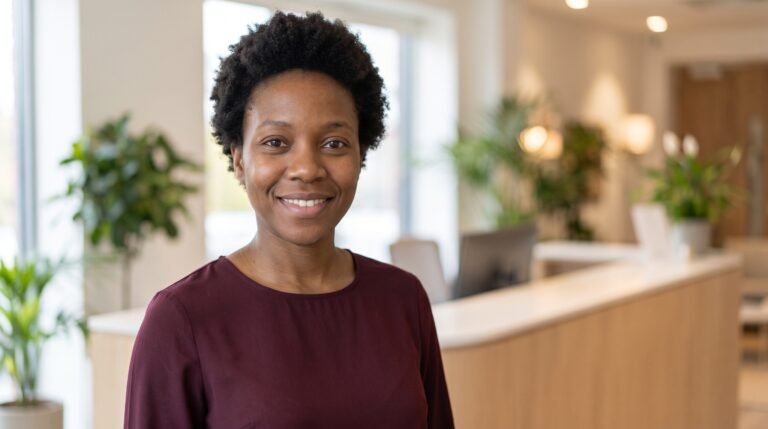
Start with the woman in the uploaded photo and preserve her face completely — identical features, skin tone, and age, with no smoothing or reshaping. She is photographed as the welcoming face of a business, standing in a bright modern reception area wearing a smart burgundy blouse, a clean desk and soft greenery blurred behind her. Chest-up framing, warm even light, a genuine welcoming smile, looking into the lens. Photorealistic, real skin texture, no visible logos or text, no watermark.

✦ Expert insight

Front-of-house portraits should feel like the greeting she gives at the door. Warm colours and a real smile outperform formal suits in this role. Expert insight: Reception backgrounds tempt the AI to invent signage and logos — always check for gibberish text behind her. The prompt forbids it, but one stray fake logo is the most common reason to regenerate this style.

Use in Gemini

The uploaded photo defines who she is — render her face exactly from it, the same eyes, nose, lips, jawline, and skin tone, with nothing beautified or reshaped. Show her as a senior businesswoman standing in a modern boardroom, wearing a charcoal suit, a long meeting table and city windows softly blurred behind her. Framed from the waist up with straight, assured posture, clean office light, a composed professional expression, looking into the camera. True corporate photography, natural skin, no text, no watermark, no other people.

✦ Expert insight

Standing boardroom framing carries authority — the right choice for founder and leadership bios. Waist-up gives websites flexible cropping room. Expert insight: City windows behind glass can render as random building patterns; heavy blur is the safeguard. If her result's windows look oddly sharp, ask for the same portrait with a 'more strongly blurred background' rather than a new scene.

Use in Gemini

Turn the uploaded photo into a modern workplace portrait: she wears a charcoal blazer over a white blouse, standing in a modern glass office with a city skyline softly blurred behind her and a laptop on a desk nearby. Bright office daylight, confident professional smile, 3:4 vertical portrait. Her face stays precisely as it appears in the uploaded photo — identical eyes, nose, lips, jawline, skin tone and age, with nothing beautified, smoothed or reshaped. The outfit and setting get a new look, but the photo dictates everything else.

✦ Expert insight

Workplace prompts should feel like a real office, not a stock photo — the laptop, desk and blurred skyline do that job without stealing focus. Bright office daylight keeps skin tones natural. One blazer colour (charcoal) plus one blouse colour (white) is a clean professional pairing that renders reliably.

Use in Gemini

Build your business headshot prompt

Step 1 of 3

Press Enter for next
Your prompt is assembling

Turn the uploaded selfie into a business headshot of the same woman for a company website. Preserve her face faithfully - the same features, skin tone, and age, with nothing beautified or reshaped. She wears a tailored blazer over a plain blouse. The background is a bright modern office interior, blurred. Framed from the chest up with a straight, confident posture, clean even office light, a warm professional expression, looking into the lens. True-to-life corporate photography, no text, no watermark, no other people.

The team page is a trust page

When a visitor is deciding whether to contact a company, the team page does quiet, heavy work. Faces make a business feel real: real people answer the phone, stand behind the work, and will be there if something goes wrong. Pages that hide behind stock photos or logos feel anonymous by comparison - and anonymous is hard to trust with money.

Why generated headshots fit business sites

The traditional answer is a photographer for a day, which small teams postpone for years. The result is the familiar mess: one good photo, two phone snapshots, and a missing box for the newest hire. These prompts fix the consistency problem instead. Every prompt starts from a person's own selfie, keeps the face faithful, and rebuilds the scene around it - tailored clothing, a calm office or studio background, and even, flattering light. Run the whole team through the same background choice and the page suddenly looks like it was planned.

Keeping it honest

A business headshot should be the person on her best normal day - not a different person. That is why every prompt here carries explicit face-preservation wording and why we check each result against the source selfie. If she has changed her hair or started wearing glasses, update the selfie first; customers who meet her in person or on a call should recognise the woman from the website. Used that way, an AI headshot is not a trick. It is the studio session she never had time for, at the quality her work deserves.

Questions, answered

Can a whole team use these prompts?

Yes - pick one background and framing in the builder and run every team member's selfie through it. The page will look like one photographer took them all.

What makes a headshot look 'business' rather than casual?

Structured clothing (a blazer or tailored top), an uncluttered background, even light, and a direct, friendly expression. All four are written into these prompts.

Should the photo match her real role?

Yes. A founder can carry a more formal look; a support team member reads better warm and approachable. The builder's role step adjusts the outfit.

Can she use the same photo on LinkedIn too?

Absolutely - the framing here suits LinkedIn's crop as well. One good headshot should serve the website, LinkedIn, and speaker bios alike.

What if her result looks too polished?

Ask for the softer options in the builder - knit top instead of a suit, window light instead of studio light - and generate again. Real beats glossy on a business page.

More prompt styles

About this guide

Founder & Editor, LadyPrompts

Bushra Daniyal is the founder and editor of LadyPrompts. She builds and checks every prompt collection on the site, with one rule: the woman in the result must still be you.

Last updated November 4, 2026

Found a mistake or have a suggestion? Contact us

Prompt copied!